
A guten voch!
This evening, drawing inspiration from reading about mechanisms that went into building of the Mishkan, I wanted to answer a simple question of what my AWS bill was for the past year. Earlier in my career, a wise manager taught me to “make easy things easy”. Those of you who know me personally will also know that I like to automate as much as possible. I did not want to whip up a calculator and iterate over 12 separate bills. That would not enable a repeatable process.
Amazon Q to the res-Q (ha!).
Within ensuing 45 minutes I was able to:
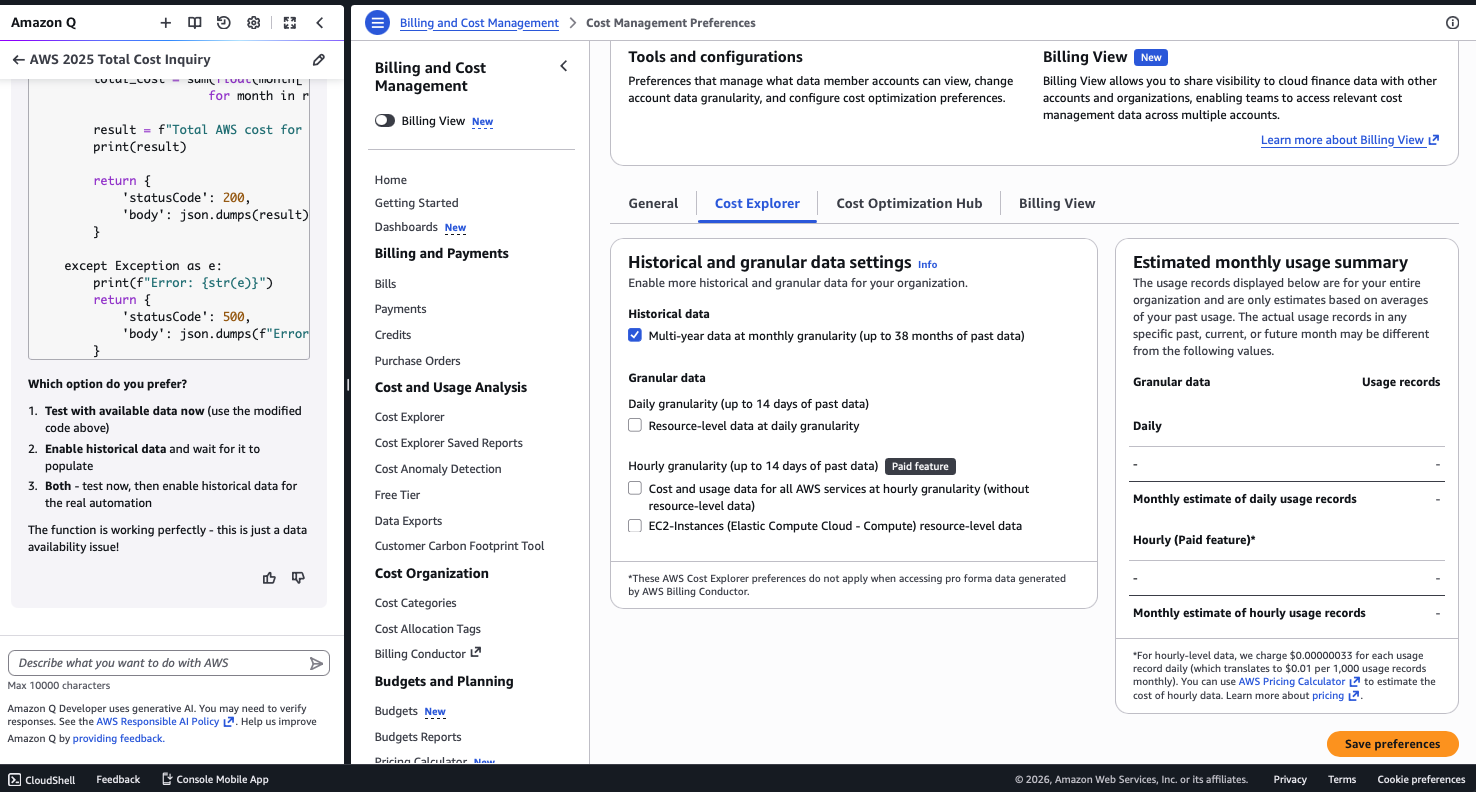
- learn that, by default, AWS Billing and Cost Management displays only the past 14 months (excluding January 2025 in my case, since I am right in the middle of March today)
- realize how to fix that, by using a new feature that enables multi-year retention (up to 38-months, as of this writing)
- create and deploy a serverless AWS Lambda function that runs on a x86 Python runtime
- have that function use Cost Explorer APIs to pull historical usage data
- authorize this code with appropriate service control policy to allow execution in a dedicated IAM role
- rely on AWS EventBridge scheduling (I’ll have to later dive into why the teams did not just name it Cron, at least phonetically)
- feed the output to Amazon Simple Email Service, to get an e-mail report with this, which required creation of identities (really fun)
- test this end-to-end whilst making minor refinements
- write it up and get you to read (so you could be confident to try) it
Figure 1. Selecting multi-year data
Services brought together as part of the overall solution:
- AWS Lambda – unlocks serverless deployments (there are servers to hug; you don’t have to 😉
- AWS IAM (Identity and Access Management) – fundamental to proper deployments
- Amazon EventBridge – not your grandfather’s scheduler
- AWS Cost Explorer – know thy appetite
- Amazon SES (Simple Email Service) – xbiff and PINE never saw this coming
Here’s a visual diagram. (And if you appreciate good ASCII art history, consider a visit to Roy/SAC)
┌─────────────────────────────────────────────────────────────────────────────┐
│      AWS Account (my_own_account_nothing_to_see_here_smile_and_wave,b0ys)   │
├─────────────────────────────────────────────────────────────────────────────┤
│                                                                             │
│  ┌─────────────────┐    ┌──────────────────────────────────────────────┐    │
│  │   EventBridge   │    │                                              │    │
│  │   (Scheduler)   │    │            AWS Lambda Function               │    │
│  │                 │────┤    "annual-cost-report-very-original,sir"    │    │
│  │ CRON Expression │    │                                              │    │
│  │ 0 1 1 1 ? *     │    │  ┌─────────────────────────────────────────┐ │    │
│  │ (Jan 1, 8pm ET) │    │  │           Python 3.12 Code              │ │    │
│  └─────────────────┘    │  │                                         │ │    │
│                         │  │  1. Get previous year dates             │ │    │
│                         │  │  2. Call Cost Explorer API              │ │    │
│                         │  │  3. Process cost data                   │ │    │
│                         │  │  4. Format email report                 │ │    │
│                         │  │  5. Send via SES                        │ │    │
│                         │  └─────────────────────────────────────────┘ │    │
│                         └──────────────────────────────────────────────┘    │
│                                   │                                         │
│                                   │                                         │
│                  ┌────────────────┼────────────────┐                        │
│                  │                │                │                        │
│                  ▼                ▼                ▼                        │
│                                                                             │
│  ┌─────────────────┐    ┌─────────────────┐    ┌─────────────────┐          │
│  │  Cost Explorer  │    │      IAM        │    │      SES        │          │
│  │      API        │    │   (Permissions) │    │  (Email Service)│          │
│  │                 │    │                 │    │                 │          │
│  │ • GetCost&Usage │    │ Lambda Role:    │    │ • SendEmail     │          │
│  │ • Previous year │    │ • CostExplorer  │    │ • Verified      │          │
│  │   data (2025)   │    │   Access        │    │   Identity      │          │
│  │ • Monthly       │    │ • SES SendEmail │    │                 │          │
│  │   breakdown     │    │   Permission    │    │                 │          │
│  └─────────────────┘    └─────────────────┘    └─────────────────┘          │
│                                                         │                   │
└────────────────────────────────────────────────────── ──┼───────────────────┘
                                                          │
                                                          ▼
                                                  ┌─────────────────┐
                                                  │   Email Report  │
                                                  │                 │
                                                  │ Subject: AWS    │
                                                  │ Annual Cost     │
                                                  │ Report - 2025   │
                                                  │                 │
                                                  │ Total: $my_bil  │
                                                  │ Monthly BBB     │
                                                  │ ...             │
                                                  └─────────────────┘
Figure 2. Deploying and testing AWS Lambda
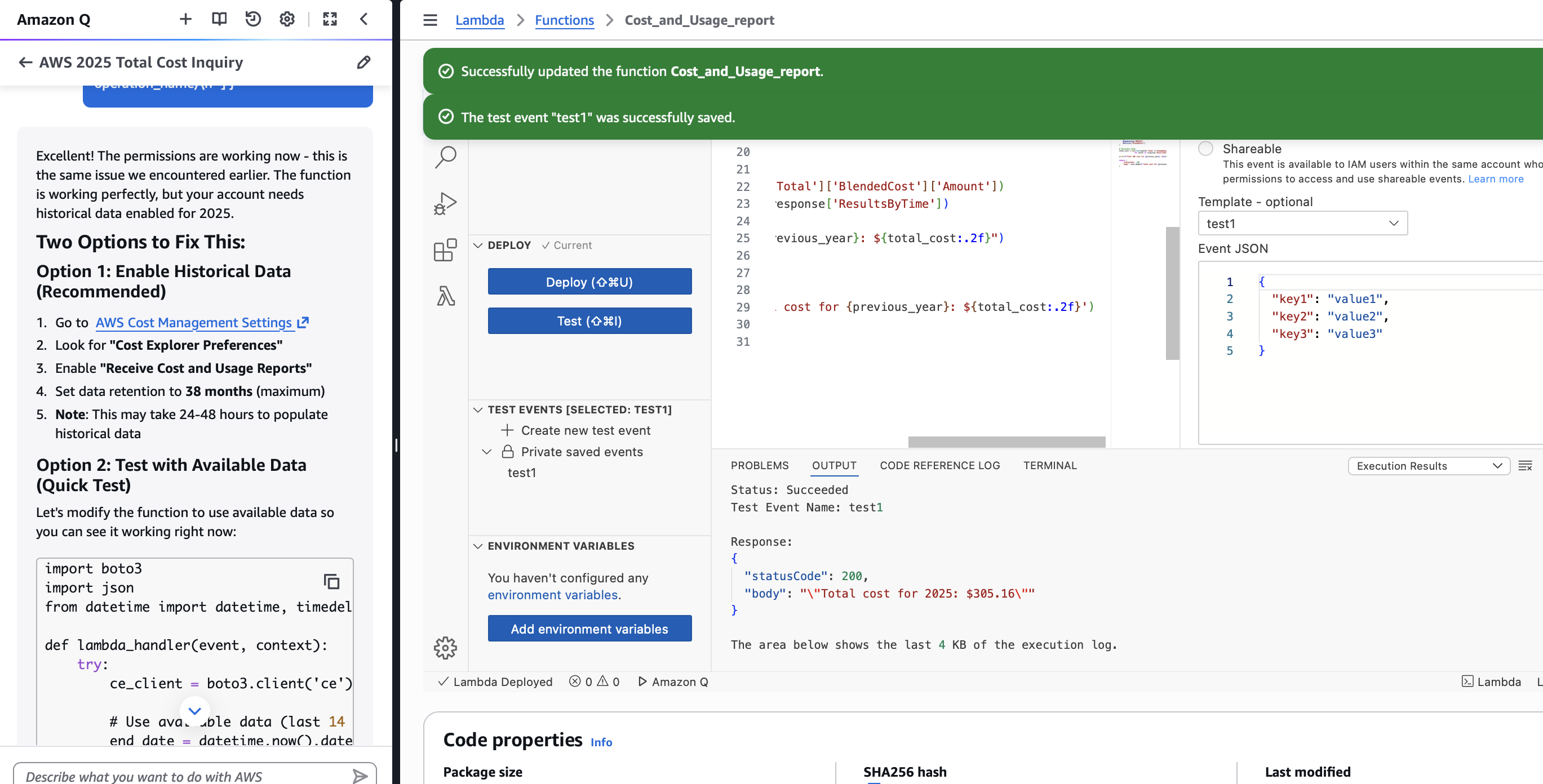
Once the Lambda function is deployed and tested, the appropriate integration with SES takes place.
The data flow sequence can be illustrated in the following 8 steps:
1. EventBridge Timer ──────────────────────────────────────────────────┐
   (January 1st, 8pm ET)                                               │
                                                                       ▼
2. Lambda Function Triggered ──────────────────────────────────────────┐
   (annual-cost-report)                                                │
                                                                       ▼
3. Lambda calls Cost Explorer API ─────────────────────────────────────┐
   GET /GetCostAndUsage                                                │
   TimePeriod: 2025-01-01 to 2025-12-31                                │
                                                                       ▼
4. Cost Explorer returns data ─────────────────────────────────────────┐
   Monthly cost breakdown                                              │
                                                                       ▼
5. Lambda processes and formats ───────────────────────────────────────┐
   Creates email content                                               │
                                                                       ▼
6. Lambda calls SES API ───────────────────────────────────────────────┐
   SendEmail with report                                               │
                                                                       ▼
7. SES delivers email ─────────────────────────────────────────────────┐
   To: <you already know my email>                                     │
                                                                       ▼
8. I receive the annual cost report ───────────────────────────────────┘
A word on service relationships? A picture speaks a thousand words.
EventBridge ──triggers──> Lambda ──calls──> Cost Explorer
                            │                     │
                            │                     ▼
                            │              Returns cost data
                            │                     │
                            ▼                     │
                         Uses IAM ◄──────────────┘
                         permissions
                            │
                            ▼
                         Calls SES ──sends──> Email Report
In summary, this is a simple example of a serverless, automated cost reporting system that can help you stay ahead of runaway costs due to ever evolving application and infrastructure deployments or potentially unexpected mechanisms breaking and resulting in bills that could contribute to untimely hair loss. It:
- Runs once per year automatically
- Fetches a previous year’s AWS costs
- Breaks down costs by month
- Emails a detailed report
- Requires zero maintenance
- Costs virtually nothing to operate
Total annual cost:
- Lambda: ~$0.00 (runs once per year for seconds)
- EventBridge: ~$0.00 (1 event per year)
- Cost Explorer: Free
- SES: ~$0.00 (1 email per year)
- IAM: Free
To summarize the benefits of this approach:
- Serverless: No servers to manage
- Scalable: Handles any amount of cost data
- Reliable: AWS manages all the infrastructure
- Cost–effective: Pay only for what I use
- Automated: Set it and forget it
Oh, and in case you missed it earlier — this week Amazon Web Services are celebrating our 20th anniversary! Happy anniversary!
Here’s to experimenting, learning and building better, faster, together — wherever you are!

 don't JUST LEAVE me, try knishes
Recent Comments