
I have a Panasonic SMART TV that’s 2+ years old and one of the built-in apps is a Netflix viewer. (I smiled when I noticed a little GNU/Linux license enclosure when I’d been unpacking the unit sometime ago). Being the holidays and all, decided to give it a go but noticed that the Netflix app would error-out during initialization, with an error complaining of inability to connect. Did the usual troubleshooting (latest firmware: check, Netflix player update: check, DHCP: check, other apps work: check, google DNS: 8.8.8.8: check). After a few seconds of searching noticed oodles of blog posts on how to deal the Netflix log-on problems with allegedly buggy Panasonic firmware and proxy servers. Of course, none of the combination sequences of up/up, down/down, left/right, left/right, up/up/up/up resolved the issue for me.
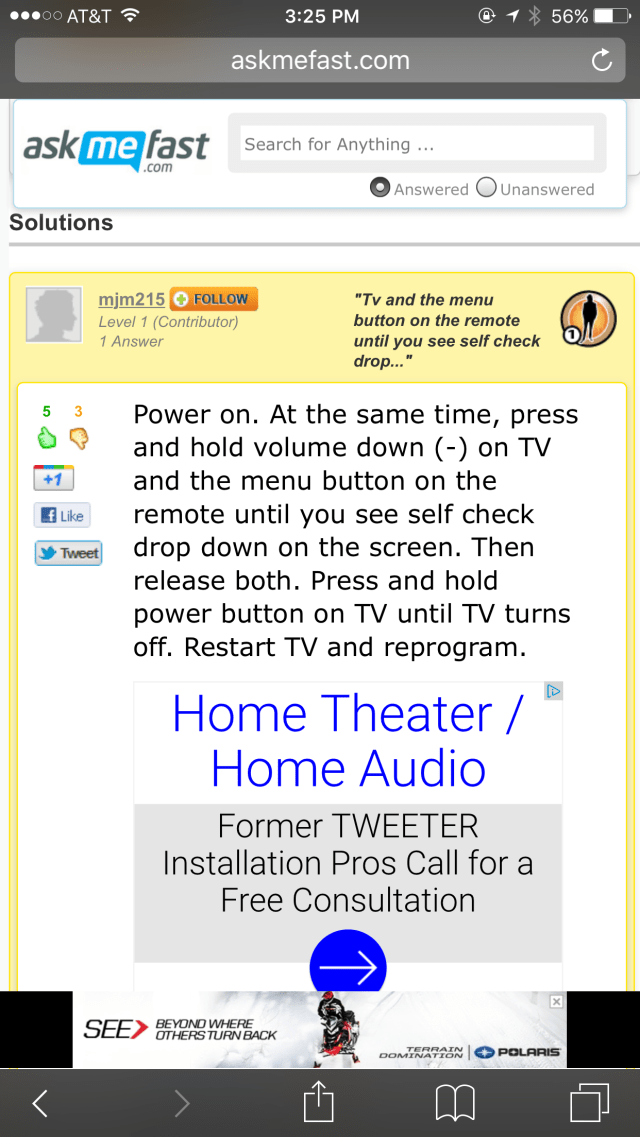
I called Panasonic tech support and, after asking me 10 questions about who I am, where I reside, what my email address is and the model of my TV, they told me that my TV is beyond the 12-month FREE technical support time frame and that for a one-time nominal fee they would help me. Really?! I was amazed at how my request for assistance with a factory reset was challenged by a company with such a solid product line as they would expect me to participate in the modern exercise of one-way monetization: “customer’s device is at fault, let’s make them pay”. So with that option at hand, I opted to spend a few more minutes googling – and naturally, came across this goldmine, which helped resolve my issue! The solution is to opt for a factory reset (no big deal) – as follows:
- Power “ON” the TV while holding down the volume down (-) button on the TV and the menu button on the remote.
- Look for the self-check message on the screen, once it appears, release the buttons.
- Power “OFF” the TV and then power it back “ON”.
- Proceed to reprogram the TV to your liking
Kudos to mjm215 of askmefast.com and their mobile-friendly interface, I was able to do all this on an iPhone…

 don't JUST LEAVE me, try knishes
Recent Comments